Honhaar Scholarship Online Apply 2026: Step by Step
By HonhaarGuide Editorial Team · Last verified: · Editorial policy

Apply for the Honhaar Scholarship Phase-IV only on the official portal. Official FAQ 15 says to enter accurate information, upload your documents and submit before the deadline. First create an account with your CNIC, email, phone number and a password. There is no application fee and no hard copy. The steps after registration follow the official 2025 guide.
Steps
- 1. Open the official registration page
Go to the official registration page at https://honhaarscholarship.punjabhec.gov.pk/register.php. Do not use any other website to register.
honhaarscholarship.punjabhec.gov.pk/
The official portal home page. The Apply Now button opens registration. Screenshot of the official portal, taken on 21 November 2026. - 2. Create your account
Choose your nationality, province, institute type and institute. Enter your 13-digit CNIC without spaces or dashes, your email, your phone number and a password of at least 6 characters with at least one number and one character. Press Submit.
honhaarscholarship.punjabhec.gov.pk/register.php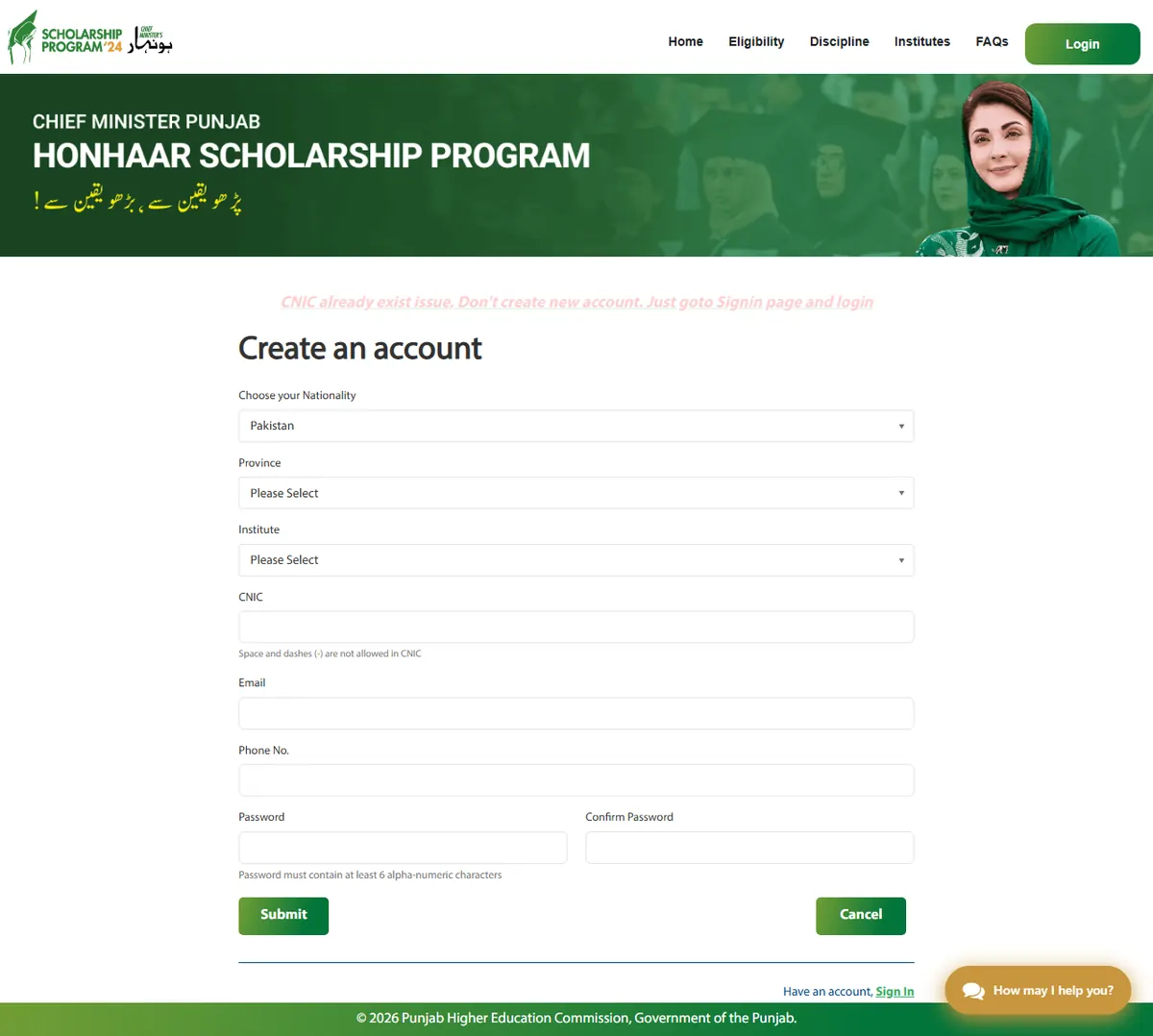
The Create an account form on register.php. Screenshot of the official portal, taken on 21 November 2026. - 3. Save your username and password
The official 2025 how-to guide says the next screen shows your username and password. Save them. The SOP sample screen says an email is also sent.
- 4. Sign in
Open https://honhaarscholarship.punjabhec.gov.pk/signin.php and enter your CNIC as the username, your password and the captcha code.
honhaarscholarship.punjabhec.gov.pk/signin.php
The Login form on signin.php: CNIC as username, password and the captcha code. Screenshot of the official portal, taken on 21 November 2026. - 5. Fill the form tabs
The 2025 how-to guide lists the tabs Eligibility, Personal Detail, Address and Education. Fill each one and press SAVE AND CONTINUE.
- 6. Upload your documents
On the Documents tab, upload each document. The 2025 how-to guide asks for JPG or PNG files of less than 200 KB.
- 7. Review and submit
Check every field on the Review tab, because the SOP says you cannot edit the application after you press Submit. Then submit, note your application ID and print or save the form.
How do you apply for the Honhaar Scholarship online?
You apply for the Honhaar Scholarship online, on the official portal only. The current round is Phase-IV, and official FAQ 1 says its first-year category is for students enrolled in Fall 2026. Official FAQ 15 says to enter accurate information, upload the documents and submit before the deadline. These are the steps.
- Open the official registration page (register.php).
- Fill the "Create an account" form: nationality, province, institute type (University, College or Medical College), your institute, CNIC, email, phone number, password and confirm password.
- Save the username and password shown on the next screen.
- Sign in with your CNIC, password and the captcha code.
- Fill the form tabs and press SAVE AND CONTINUE on each one.
- Upload your documents on the Documents tab.
- Check everything on the Review tab, then press Submit.
- Note your application ID and print or save the form.
| Form tab | What the official 2025 how-to guide shows |
|---|---|
| Eligibility | Eligibility information and a "Download Sample Affidavit" link |
| Personal Detail | Your details and a photograph of at most 200 KB with your face clearly visible. Dates are picked from the calendar, not typed |
| Address | Your address |
| Education | Your Matric and Intermediate details |
| Documents | Uploads in JPG or PNG format, each less than 200 KB |
| Review | A check of the whole form before you submit |
| Submit | The message "Thank you for applying in Honhaar Scholarship!", an application ID and a status |
The registration fields in step 2 come from the live registration page. Steps 3 to 8 and the table come from the official how-to guide (headed "For 2025") and the official SOP (2025-26 edition). The portal does not state whether these screens are the same for Phase-IV, so follow what the live portal shows if it differs.
The registration page says the password must be at least 6 characters long and contain at least one number and one character. The CNIC must be 13 digits with no spaces or dashes.
Is there an official video on how to apply for the Honhaar Scholarship?
Yes. The How to Apply link in the official portal menu opens this video. It plays here from the official server. This guide has not reviewed what the video says, so follow the live portal if a screen differs.
Is there an application fee for the Honhaar Scholarship?
No. Official FAQ 17 says there is no fee to apply for the Honhaar Scholarship. Official FAQ 16 says no hard copy is needed, because the application is submitted online through the portal.
- Do not pay an agent, a shop or a website to apply for you.
- Do not give your CNIC, password or documents to anyone. Enter them only on the official portal.
- HonhaarGuide.pk is an independent guide. It has no login and does not collect any data.
The registration page itself warns applicants who use internet cafes to always log out, clear the browser history, change the password and avoid saving login details.
Can you apply for the Honhaar Scholarship from a mobile phone?
The official Honhaar Scholarship homepage links an Android app on Google Play and an iPhone app on the App Store. The official pages read for this guide do not say whether every step of the application can be completed in the app or in a phone browser, and this guide has not reviewed the app. The 2025 how-to guide's upload rules are listed in the form tab table above; the portal does not say whether the app applies them. See the mobile app guide for the official download links.
What do you need before you start the Honhaar Scholarship application?
| Item | Why you need it | Official source |
|---|---|---|
| Your own CNIC (13 digits) | Registration, and it is your username | Registration and sign-in pages |
| An email address you check | Registration, and status updates may arrive by email | Registration page, FAQ 30 |
| A phone number | Registration | Registration page |
| Mandatory documents | Upload on the Documents tab | FAQ 22 |
| Income affidavit on e-stamp paper of at least Rs. 50 | Proof that your monthly family income is within the limit | FAQ 23, FAQ 24, FAQ 25 |
| A clear photograph | Personal Detail tab (at most 200 KB) | 2025 how-to guide |
| Matric and Intermediate marks | Education tab | 2025 how-to guide |
The last two rows come from the official how-to guide headed "For 2025". The portal does not state whether this applies to Phase-IV.
Official FAQ 22 says the mandatory documents may include CNIC front, CNIC back, the Matric or O-Level equivalence certificate, the Intermediate or A-Level equivalence certificate, the Punjab domicile certificate and the income affidavit. See the documents guide and the income affidavit guide. Check that you meet the eligibility criteria first.
Check the deadline too. The two official pages show different dates:
| Official page | Date shown |
|---|---|
| Homepage | 22 November 2026 |
| FAQ page (FAQ 2) | 9 November 2026 |
Confirm the date on the official portal before you rely on either one. The last date guide has more detail.
What are common mistakes in the Honhaar Scholarship online application?
- Using another person's CNIC. The official SOP (2025-26 edition) and the 2025 how-to guide say this will result in disqualification.
- Making a second account. The registration page says that if you see "CNIC already exist", do not create a new account. Go to the sign-in page and log in.
- Typing the CNIC with dashes or spaces. The registration and sign-in pages say spaces and dashes are not allowed.
- Typing dates by hand. The 2025 how-to guide says dates must be selected from the calendar.
- Uploading large or wrong files. The 2025 how-to guide asks for JPG or PNG files of less than 200 KB.
- Submitting without checking. The SOP's Review tab says you cannot edit your application once you click Submit. Official FAQ 20 says to contact the focal person of your university or college if information needs correcting after submission.
- Missing emails. Official FAQ 30 says applicants are told about their status by email, on the portal or by their institution. Check your spam or junk folder too.
- Waiting until the last day. Official FAQ 2 says to apply well before the deadline.
The SOP and how-to guide items above are from the 2025-26 SOP and the 2025 guide. The portal does not state whether they apply to Phase-IV.
Honhaar scholarship online apply kaise kare?
Honhaar Scholarship ke liye sirf official portal par apply karein: registration page par CNIC, email, phone aur password se account banayein, phir sign in karke form ke tabs bharein, documents upload karein aur Review ke baad Submit karein. Apply karne ki koi fee nahi hai aur hard copy nahi bhejni.
Frequently asked questions
Is there a fee to apply for the Honhaar Scholarship?
No. Official FAQ 17 says there is no application fee. Do not pay anyone to apply for you.
Do I need to send a hard copy of the Honhaar Scholarship form?
No. Official FAQ 16 says no hard copy is required. The application is submitted online through the official portal.
Can I download the Honhaar Scholarship application form?
Official FAQ 16 says no hard copy is required and the application is submitted online. After you submit, the 2025 how-to guide says you can print and save the form. The homepage also links a sample affidavit.
What is the official Honhaar Scholarship registration link?
The official registration page is https://honhaarscholarship.punjabhec.gov.pk/register.php. The sign-in page is https://honhaarscholarship.punjabhec.gov.pk/signin.php.
Is there an official video on how to apply for the Honhaar Scholarship?
Yes. The How to Apply link in the official portal menu opens a video of about 9 minutes, which you can play on this page from the official server. The portal also has a How to Apply PDF guide headed 'For 2025'. This guide has not reviewed the video.
Honhaar scholarship form kaise bhare?
Official portal par account banayein, CNIC aur password se sign in karein, har tab bharein, documents upload karein aur Review ke baad Submit karein. Official 2025 guide ke mutabiq Submit ke baad form edit nahi hota.